Three platforms have emerged as leaders in this space: Arduino, Raspberry Pi, and STM32. Each offers unique capabilities, advantages, and limitations that make them suitable for different applications. The question isn't necessarily which one is best, but rather which one is best for your specific needs.
"The most significant distinction between Arduino and Raspberry Pi is that the former is a microcontroller that can only execute compiled C code, while Raspberry Pi is a full-fledged computer running Linux."
In this comprehensive guide, we'll compare these three popular development platforms across multiple dimensions, including hardware capabilities, ease of use, community support, and cost-effectiveness. By the end, you'll have a clear understanding of which platform aligns best with your project requirements and skill level.
Are you looking for a straightforward platform to control LEDs and sensors? Or do you need a more powerful system capable of running complex applications with networking capabilities? Let's explore the unique characteristics of each platform to help you make an informed decision.
Understanding Development Boards: MCUs vs. SBCs
Before diving into the specifics of each platform, it's important to understand the fundamental difference between microcontroller units (MCUs) and single-board computers (SBCs).
Microcontroller Units (MCUs)
MCUs like Arduino and STM32 are designed to perform specific tasks repeatedly. They:
Run a single program in an endless loop
Have limited processing power and memory
Excel at real-time operations and direct hardware control
Consume minimal power
Boot instantly
Are ideal for dedicated tasks and sensor interaction
Single-Board Computers (SBCs)
SBCs like Raspberry Pi are essentially compact computers that:
Run full operating systems (typically Linux)
Can execute multiple programs simultaneously
Offer significantly more processing power and memory
Include built-in networking capabilities
Support video output, audio, and USB peripherals
Consume more power
Require boot-up time
As explained in a undefinedcomparison by RS Components: "Raspberry Pi belongs to the MPU category, while Arduino and STM32 belong to the MCU category. They have a huge gap in computing power."
This fundamental distinction drives many of the differences in capabilities, applications, and programming approaches between these platforms. Now, let's examine each platform in detail.
Arduino: The Beginner-Friendly Microcontroller
Arduino has revolutionized the maker movement by offering an accessible entry point into the world of electronics and programming. With its straightforward programming language, extensive documentation, and massive community support, Arduino has become synonymous with electronics prototyping.
Key Features of Arduino
Simplicity: Arduino's programming environment (IDE) is designed for beginners
Versatility: Extensive library of add-on shields for expanded functionality
Community: Massive ecosystem of tutorials, projects, and forums
Cost-effective: Arduino boards are generally affordable
Low power consumption: Ideal for battery-powered projects
Direct hardware control: Excellent for immediate sensor reading and actuator control
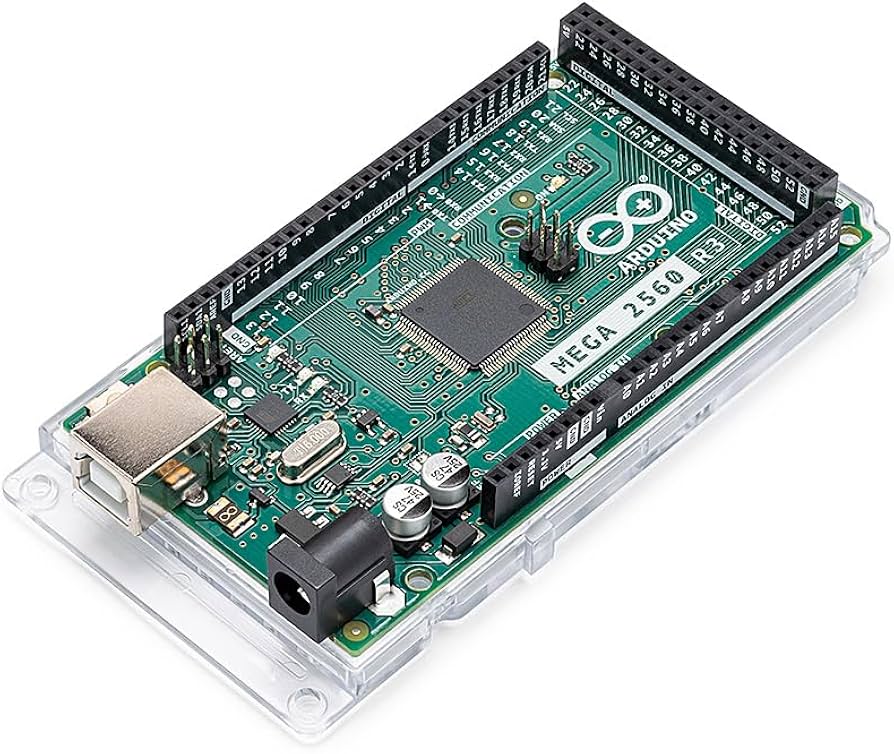
Arduino Mega 2560 development board with 54 digital I/O pins
Arduino Mega 2560 Specifications
The Arduino Mega 2560 is one of the most powerful boards in the Arduino family. Here are its key specifications:
| Feature | Specification |
|---|---|
| Microcontroller | ATmega2560 |
| Operating Voltage | 5V |
| Input Voltage (recommended) | 7-12V |
| Digital I/O Pins | 54 (of which 15 provide PWM output) |
| Analog Input Pins | 16 |
| DC Current per I/O Pin | 20 mA |
| Flash Memory | 256 KB (8 KB used by bootloader) |
| SRAM | 8 KB |
| EEPROM | 4 KB |
| Clock Speed | 16 MHz |
| Length | 101.52 mm |
| Width | 53.3 mm |
| Weight | 36 g |
Arduino Programming Model
Arduino programming revolves around two main functions: setup() and loop(). The setup() function runs once when the board starts, while the loop() function runs repeatedly. This simple structure makes it accessible for beginners while still offering enough flexibility for complex projects.
Raspberry Pi: The Versatile Single-Board Computer
Raspberry Pi has transformed the landscape of computing by providing affordable, credit card-sized computers that can run full operating systems. Founded with educational goals, Raspberry Pi has expanded beyond education into countless applications from home automation to industrial prototyping.
Key Features of Raspberry Pi
Full computing power: Runs a complete operating system
Multimedia capabilities: HDMI output, audio processing, camera interfaces
Networking: Built-in Ethernet and Wi-Fi (on most models)
Extensive I/O: USB ports, GPIO pins, display and camera interfaces
Multitasking: Can run multiple applications simultaneously
Programming flexibility: Supports numerous programming languages
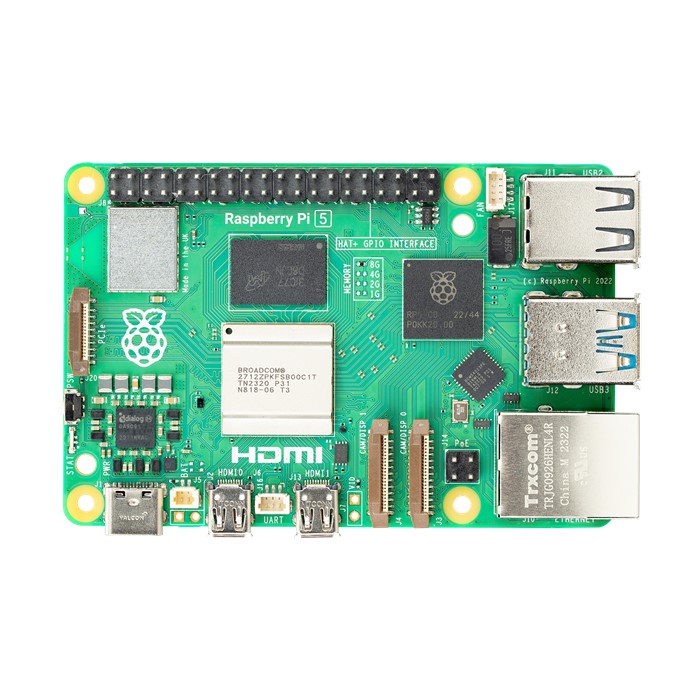
Raspberry Pi 5 with 8GB RAM and advanced processing capabilities
Raspberry Pi 5 Specifications
The latest Raspberry Pi 5 represents a significant leap in performance from previous generations:
| Feature | Specification |
|---|---|
| Processor | Broadcom BCM2712 quad-core Arm Cortex A76 @ 2.4GHz |
| GPU | VideoCore VII, supporting OpenGL ES 3.1, Vulkan 1.2 |
| Memory | 4GB or 8GB LPDDR4X-4267 |
| Video Output | Dual 4Kp60 HDMI with HDR support |
| Video Decoder | 4Kp60 HEVC decoder |
| USB Ports | 2 × USB 3.0, 2 × USB 2.0 |
| Networking | Gigabit Ethernet |
| Wireless | Wi-Fi 802.11ac, Bluetooth 5.0 |
| GPIO | 40-pin header compatible with previous Raspberry Pi boards |
| Power Input | USB-C, 5V/5A |
| Real-time Clock | Yes, with battery backup support |
| Performance | 2-3× increase in CPU performance relative to Raspberry Pi 4 |
"Featuring a 64-bit quad-core Arm Cortex-A76 processor running at 2.4GHz, Raspberry Pi 5 delivers a 2–3× increase in CPU performance relative to Raspberry Pi 4." - undefinedOfficial Raspberry Pi Website
Operating System Options
Unlike microcontroller boards, Raspberry Pi runs full operating systems. Popular options include:
Raspberry Pi OS (formerly Raspbian): The official Linux-based OS
Ubuntu: Popular Linux distribution with various flavors
RetroPie: For retro gaming enthusiasts
OSMC or LibreELEC: Media center focused distros
Windows IoT Core: Microsoft's IoT platform
STM32: The Professional-Grade Microcontroller
STM32 microcontrollers, developed by STMicroelectronics, represent a step up in performance and capabilities from Arduino while still remaining in the microcontroller category. These ARM Cortex-M-based MCUs offer professional-grade features that make them popular in industrial applications and among advanced electronics enthusiasts.
Key Features of STM32
High performance: More processing power and memory than traditional Arduino boards
Advanced peripherals: Rich set of communication interfaces and specialized hardware
Power efficiency: Multiple power-saving modes
Flexibility: Wide range of models with different capabilities
Professional development tools: Support for industry-standard IDEs
Cost-effective: Excellent performance-to-price ratio
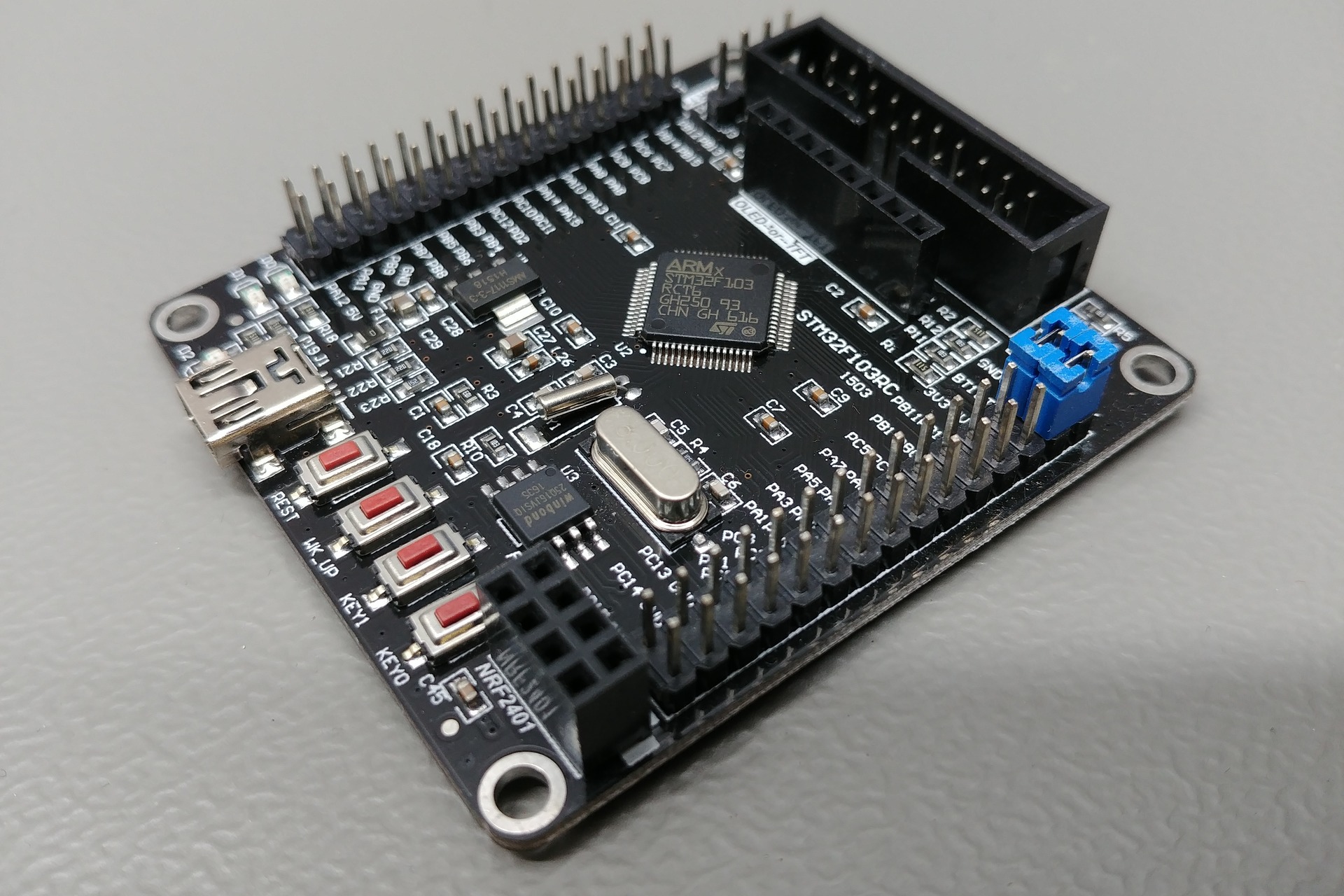
STM32F103 development board with extensive I/O capabilities
STM32 Development Board Specifications
While STM32 comes in many variants, here are the specifications for a popular STM32F103 "Blue Pill" development board:
| Feature | Specification |
|---|---|
| Microcontroller | STM32F103C8T6 (ARM 32-bit Cortex-M3) |
| Operating Voltage | 3.3V |
| Input Voltage | 5V (USB) or 3.3V (pins) |
| CPU Clock | 72 MHz max |
| Flash Memory | 64 KB (128 KB in some variants) |
| SRAM | 20 KB |
| Digital I/O Pins | 37 GPIO pins |
| Analog Input Pins | 10 (12-bit ADC) |
| Communication | 2 × SPI, 2 × I2C, 3 × USART, USB, CAN |
| Timers | 3 × 16-bit, 1 × 16-bit PWM |
| Dimensions | 53mm × 22.5mm |
STM32 Development Ecosystem
Unlike Arduino's unified IDE, STM32 development can be done through multiple environments:
STM32CubeIDE: Official IDE from STMicroelectronics
Arduino IDE: With STM32 core extension
PlatformIO: Modern, integrated development environment
Keil MDK: Professional development environment
Mbed OS: Cloud-based IoT operating system
Advantages of STM32
According to undefinedThink Robotics, the key advantages of STM32 development boards include:
Versatility: The STM32 family offers a wide range of microcontrollers with different capabilities, allowing developers to select the perfect chip for their specific needs.
Community and Support: A growing community of developers and comprehensive documentation from STMicroelectronics.
Cost-Effectiveness: High performance at a competitive price point compared to other professional-grade MCUs.
Head-to-Head Comparison: Arduino vs. Raspberry Pi vs. STM32
Now that we've explored each platform individually, let's compare them directly across several key dimensions:
| Feature | Arduino (Mega 2560) | Raspberry Pi 5 | STM32 (F103) |
|---|---|---|---|
| Type | Microcontroller | Single-Board Computer | Microcontroller |
| Processor | ATmega2560 (8-bit) | BCM2712 (64-bit quad-core Arm Cortex-A76) | ARM Cortex-M3 (32-bit) |
| Clock Speed | 16 MHz | 2.4 GHz | 72 MHz |
| RAM | 8 KB | 4-8 GB | 20 KB |
| Storage | 256 KB Flash | microSD card (external) | 64-128 KB Flash |
| Operating System | None (bare metal) | Linux-based (multiple options) | None (bare metal) |
| Power Consumption | Low (~50-100 mA) | High (~500-1000 mA) | Low (~20-50 mA) |
| GPIO Pins | 54 digital (15 PWM) | 40 GPIO pins | 37 GPIO pins |
| Analog Input | 16 (10-bit) | None (requires ADC) | 10 (12-bit) |
| USB Ports | 1 (programming) | 4 (2×USB 3.0, 2×USB 2.0) | 1 (programming) |
| Network | None (requires shield) | Ethernet, Wi-Fi | None (requires module) |
| Display Output | None (requires additional hardware) | Dual 4K HDMI | None (requires additional hardware) |
| Programming Language | C/C++ (Arduino language) | Python, C, C++, Java, etc. | C/C++ |
| Real-Time Performance | Good | Limited (OS overhead) | Excellent |
| Beginner-Friendly | Excellent | Good | Moderate |
| Approximate Price | $30-45 | $60-80 | $5-20 |
"Most people think Arduinos are beginner tools whereas STM32 are resume fillers. At the end of the day most of them have similar capabilities." - undefinedReddit r/embedded
Strengths and Weaknesses Analysis
Arduino Strengths and Weaknesses
Strengths
Beginner-friendly: Simplified programming environment and syntax
Extensive community support: Countless tutorials, libraries, and forums
Plug-and-play shields: Easy hardware expansion
Reliable performance: Stable and predictable behavior
Low power consumption: Ideal for battery-powered projects
Weaknesses
Limited processing power: Not suitable for complex computations
Restricted memory: Cannot handle large programs or data
No native networking: Requires additional hardware for connectivity
Raspberry Pi Strengths and Weaknesses
Strengths
Full computing capabilities: Runs a complete operating system
Powerful processor: Handles complex applications and multitasking
Built-in connectivity: Ethernet and Wi-Fi for networking
Multimedia support: HDMI output, camera interfaces
Programming flexibility: Multiple language options
Weaknesses
Higher power consumption: Not ideal for battery-powered applications
Boot-up time: Not instant-on like microcontrollers
Limited real-time capabilities: OS overhead affects timing precision
STM32 Strengths and Weaknesses
Strengths
High performance: Superior processing power compared to Arduino
Advanced peripherals: Rich set of communication interfaces and hardware
Excellent power efficiency: Multiple power-saving modes
Cost-effectiveness: Great performance at competitive prices
Scalability: Wide range of compatible chips in the family
Weaknesses
Steeper learning curve: More complex than Arduino for beginners
Less beginner-friendly documentation: Resources often assume more background knowledge
Development environment setup: Can be more challenging than Arduino's simple IDE
Best Use Cases for Each Board
When to Choose Arduino
Learning electronics and programming: Perfect for beginners and educational settings
Simple automation projects: Home automation, plant watering systems
Sensor reading and monitoring: Weather stations, environmental monitoring
Robot control: Basic robotics projects and control systems
Long-running, battery-powered applications: Remote sensors, data loggers
Real-time control applications: Timing-sensitive operations
When to Choose Raspberry Pi
Projects requiring an operating system: Web servers, databases
Media centers and entertainment systems: Retro gaming, music streaming
Computer vision applications: Image recognition, object detection
Network applications: IoT hubs, VPN servers, network monitoring
Desktop replacement: Basic computing tasks, learning programming
Complex data processing: Projects requiring significant computation
When to Choose STM32
Performance-critical applications: When Arduino is too slow but Raspberry Pi is overkill
Industrial and professional projects: Commercial products, industrial control
Advanced signal processing: Audio processing, digital filters
Low-power applications requiring more power than Arduino: Advanced wearables, IoT endpoints
Learning advanced embedded programming: Moving beyond Arduino
Real-time applications needing more processing power: Complex control systems
How to Choose?
When selecting a development board, ask yourself these questions:
Do you need a full operating system or just a microcontroller?
How much processing power and memory does your application require?
What are your power consumption constraints?
Do you need specialized interfaces like HDMI or camera inputs?
What's your comfort level with programming and electronics?
What is your budget for the project?
As highlighted in a comparison by undefinedDigiKey: "Raspberry Pi offers a more advanced look at things and opens up your possibilities much further, but can also get costly. Arduino provides an excellent starting point for beginners, while STM32 offers a pathway to more professional development."
Purchase Suggestions: Top Development Boards to Consider
Based on the comparisons we've made, here are some recommended development boards available from Richard Electronics:
Raspberry Pi 5 (4GB RAM)

Features:
Broadcom BCM2712 quad-core Arm Cortex A76 processor @ 2.4GHz
4GB LPDDR4X RAM
Dual 4Kp60 HDMI display output with HDR support
2×USB 3.0 and 2×USB 2.0 ports
Gigabit Ethernet
40-pin GPIO header
Ideal for: Media centers, web servers, desktop computing, complex IoT hubs, machine learning projects
undefinedView Product
Arduino Mega 2560 (A000067)
Features:
ATmega2560 microcontroller
54 digital I/O pins (15 PWM outputs)
16 analog inputs
256KB flash memory
16MHz clock speed
USB connection
Ideal for: Beginners, educational projects, sensor monitoring, home automation, robotics, 3D printers
undefinedView Product
Raspberry Pi A+

Features:
Compact form factor
Lower power consumption than full-size models
Full compatibility with Raspberry Pi software
GPIO pins for hardware projects
Cost-effective option for embedded projects
Ideal for: Embedded systems, IoT projects with space constraints, kiosks, educational settings
undefinedView Product
Purchasing Tips
When buying development boards, consider these additional factors:
Purchase from reputable suppliers to avoid counterfeit boards
Consider getting starter kits that include accessories and components
Check compatibility with your existing equipment and components
Look for boards with good documentation and community support
Factor in the cost of necessary accessories (power supplies, SD cards, etc.)
Common Misconceptions About Development Boards
Misconception 1: "Arduino is just a toy, not for serious projects"
Reality: While Arduino is beginner-friendly, it powers countless serious applications including industrial sensors, automation systems, and commercial products. Its simplicity is a feature, not a limitation, for many applications.
Misconception 2: "Raspberry Pi can replace Arduino for all projects"
Reality: Raspberry Pi has significantly higher power consumption, boot time, and complexity that makes it unsuitable for many applications where Arduino excels, such as battery-powered devices and real-time control systems.
Misconception 3: "STM32 is only for professionals"
Reality: While STM32 has a steeper learning curve, resources like the Arduino core for STM32 and STM32CubeIDE have made these powerful microcontrollers more accessible to hobbyists and learners looking to expand their skills.
Misconception 4: "More expensive boards are always better"
Reality: The best board depends entirely on your project requirements. Sometimes a simple $5 microcontroller is more appropriate than a $75 single-board computer, especially for dedicated tasks with power or space constraints.
Development Board Selection Checklist
Use this checklist to help determine which development board is best suited for your specific project:
Project Requirements Assessment
Processing needs: Simple task automation vs. complex algorithms
Memory requirements: How much data will your project need to store/process?
I/O requirements: How many sensors, displays, or actuators will you connect?
Power constraints: Will the project run on batteries or wall power?
Size limitations: Does the project have space constraints?
Technical Considerations
Connectivity: Wi-Fi, Bluetooth, Ethernet, or cellular needed?
Real-time requirements: Does your application require precise timing?
Multimedia capabilities: Need for displays, cameras, audio?
Operating system: Do you need a full OS or just a microcontroller?
Development environment: What programming tools are you comfortable with?
Project Practical Aspects
Budget: Total cost including the board and necessary components
Timeline: Development time constraints and learning curve considerations
Support: Available documentation, tutorials, community help
Future-proofing: Potential for project expansion or modification
Availability: Can you easily obtain replacement parts and accessories?
"To choose a board, selection criteria includes the following: Supplier/Platform, Processing Power, Memory, I/O interfaces, Power Requirements, and Expansion Capabilities." - undefinedThe Embedded Rustacean
undefinedExplore ESP8266 as another development board optionReal User Experience Stories
Arduino in Education
"As a high school electronics teacher, I've found Arduino to be invaluable in introducing students to programming and electronics. The immediate feedback from controlling LEDs and reading sensors keeps students engaged. The visual programming options also help students who might be intimidated by text-based coding to get started."
- Michael T., Electronics Instructor
Raspberry Pi for Home Automation
"I started with a simple Raspberry Pi hub to control my smart home, and it's grown into a comprehensive system managing everything from lighting to security cameras. The ability to run Node-RED, Home Assistant, and custom Python scripts all on one device has eliminated the need for multiple proprietary hubs. The learning curve was worth it for the flexibility it provides."
- Sarah K., Home Automation Enthusiast
STM32 in Professional Development
"In our product development lab, we've migrated from Arduino prototypes to STM32 for final designs. The improved performance, power efficiency, and reliability have been crucial for our commercial applications. While the initial setup required more expertise, the long-term benefits for our industrial sensing equipment have been substantial."
- David R., Hardware Engineer
Transitioning Between Platforms
"I started with Arduino as a hobbyist, moved to Raspberry Pi when I needed more computing power for my robotics project, and eventually incorporated STM32 for precise motor control. Learning to use all three platforms has given me incredible flexibility in approaching new projects. I now select the right tool based on the specific requirements rather than forcing one platform to do everything."
- Jamie L., Maker and Robotics Enthusiast
Conclusion: Choosing the Right Development Board for Your Journey
After comparing Arduino, Raspberry Pi, and STM32 development boards across various aspects, it's clear that each platform serves different needs and excels in specific scenarios. The "best" board ultimately depends on your project requirements, technical background, and learning goals.
Arduino remains the go-to platform for beginners and projects requiring simplicity, reliability, and direct hardware control. Its extensive ecosystem and gentle learning curve make it perfect for educational settings and straightforward automation projects.
Raspberry Pi offers the power and flexibility of a complete computer in a compact form, making it ideal for multimedia applications, complex network projects, and situations requiring a full operating system. While it requires more power and setup time than microcontrollers, its versatility is unmatched for certain applications.
STM32 bridges the gap between Arduino's simplicity and Raspberry Pi's power, offering enhanced performance and features while remaining in the microcontroller category. For those ready to move beyond Arduino's limitations but not needing a full computer like Raspberry Pi, STM32 provides an excellent middle ground with professional-grade capabilities.
The Complementary Approach
Many experienced makers and developers keep all three platforms in their toolkit, selecting the most appropriate one for each project. Rather than viewing them as competitors, consider them complementary tools with different strengths. Some complex projects may even incorporate multiple platforms working together—for example, an STM32 handling real-time sensor readings feeding data to a Raspberry Pi for processing and cloud connectivity.
As you embark on your electronics and programming journey, remember that the skills you develop with any of these platforms will transfer to the others. Start with the board that best matches your current skill level and project needs, and don't hesitate to explore the others as your experience and requirements evolve.
The world of development boards is diverse and exciting, offering countless possibilities for creation and innovation. Whether you're building a simple LED blinker, a sophisticated home automation system, or a commercial IoT product, there's a perfect development board waiting for your next big idea.
"The question isn't about which board is objectively best, but rather which one is the right tool for your specific job. Sometimes a simple hammer is exactly what you need—no need for a power drill." - Experienced Maker's Wisdom
What's your experience?
Have you worked with any of these development boards? Which one did you find most suitable for your projects? Share your experiences and questions in the comments below!
Here are some thought-provoking questions to consider:
What project are you currently working on, and which board do you think would be best suited for it?
Have you experienced any unexpected challenges when working with any of these platforms?
What other development boards do you think deserve consideration alongside these three popular options?
How do you see these platforms evolving in the next few years?
- 1.
Can I use Arduino code on STM32 boards?
Yes, many STM32 boards can be programmed using the Arduino IDE with the appropriate core files installed. The STM32duino project provides Arduino compatibility for many STM32 microcontrollers. While this makes the transition easier, you may not be leveraging the full capabilities of the STM32 when using the Arduino framework. For more advanced projects, consider using STM32CubeIDE or other dedicated STM32 development environments.
- 2.
Can Raspberry Pi replace a desktop computer?
For basic computing tasks like web browsing, document editing, and media consumption, a Raspberry Pi can function as a budget desktop computer, especially the newer models like the Raspberry Pi 5. However, it isn't suitable for resource-intensive tasks like gaming, video editing, or professional software development. It's best viewed as a complement to a traditional computer rather than a complete replacement for most users.
- 3.
Which board is best for battery-powered IoT projects?
For battery-powered IoT projects, microcontrollers like Arduino or STM32 are generally better choices than Raspberry Pi due to their significantly lower power consumption. Between Arduino and STM32, the STM32 often offers better power efficiency with its various low-power modes, while still providing more processing power than Arduino. For specific IoT applications, also consider specialized boards like ESP8266 or ESP32, which offer built-in Wi-Fi with efficient power management features.
- 4.
I'm a complete beginner. Which platform should I start with?
For complete beginners, Arduino is typically the most accessible platform to start with. It has a straightforward programming environment, extensive documentation, and countless beginner-friendly tutorials. The immediate feedback from physical components (LEDs lighting up, motors turning) also helps reinforce learning concepts. Once comfortable with Arduino, you can explore Raspberry Pi to learn about Linux and more complex programming, or STM32 to delve deeper into embedded systems and more advanced microcontroller concepts.
- 5.
Can these boards be used in commercial products?
Yes, all three platforms can be used in commercial products, but with different considerations: Arduino: The hardware designs are open-source, and you can incorporate the microcontrollers into your products. For high-volume production, many manufacturers create custom boards based on the same ATmega chips. Raspberry Pi: While you can build products around Raspberry Pi boards, there may be supply chain challenges for large-scale production. Raspberry Pi offers the Compute Module for commercial applications that need the Pi's capabilities in a more integration-friendly form factor. STM32: These are industrial-grade microcontrollers explicitly designed for commercial applications, with long-term availability guarantees, making them ideal for products that will be manufactured at scale.
View More
 Paul George
Richard Electronics guest author, a Mechatronics engineer and a professional researcher, designer, developer and manufacturer for 3d Cad and PCB. I believe in efficiency, effectiveness and quality of work, and my aim is to provide complete one-roof solutions to complex mechanical and electrical design systems. I have a well-equipped lab with state-of-the-art technology for doing research and providing.

28 November 2025
25 October 2025
25 September 2025
16 August 2025
10 July 2025