
Arduino Mega 2560 Rev3 Clone | Review,LED Blink Test & Reset
Compared to smaller boards like Uno, the Arduino Mega 2560 has extra pins, extra memory, and a microprocessor (the ATmega2560) compared to its predecessor. This makes it appropriate for projects having many input/out (I/O) connections like robotics, automation, and interactive installations.
When memory is one of your concerns to store variables and code lines with more I/O pins then we need Arduino Mega 2560 board. This ensures that it can work well in DIY projects and professional setups due to its compatibility with different shields and modules. In this article, we will discuss the pinout of Arduino MEGA 2560 with features, datasheet, and then its IDE setting how you can write a code to blink an LED.
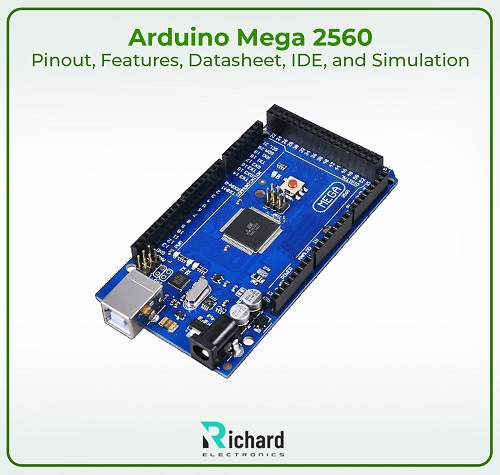
Pinout of Arduino Mega 2560(000067)
According to the manufacturer, the Arduino Mega 2560 has a broad spectrum of pins for integrating with different components, sensors, and devices. Before creating extra complicated projects, you should be conscious of its pinout. Here is a detailed view of the different types of pins (categories) available on the board:

Purchase the Arduino Mega 2560(sku:A000067)

Number of pins | Interpretations | detail |
0 | Digital I/O pin (RX) | Serial data received through UART or USB |
1 | Digital I/O pin (TX) | Used to transmit the serial data |
2 - 13 | Digital I/O pins with PWM pins | Used for PWM output or as digital pins. |
14 | Digital I/O pin (TX3) | Used for transmitting the data on the serial 3 |
15 | Digital I/O pin (RX3) | Used for receiving the data on the serial 3 |
16 | Digital I/O pin (TX2) | Used for transmitting the data on the serial 2 |
17 | Digital I/O pin (RX2) | Used for receiving the data on the serial 2 |
18 | Digital I/O pin (TX1) | Used for transmitting the data on the serial 1 |
19 | Digital I/O pin (RX1) | Used for receiving the data on the serial 1 |
20 | Data line | I2C devices communicate through it. |
21 | Clock line | I2C data timing can be controlled through it. |
22 - 53 | Digital I/O pins | Used for digital input or output. |
A0- A15 | Analog input pins | Read the analog input. |
44 - 46 | Digital I/O pins with PWM pins | Digitals pins but support the pulse width modulation |
50 | MISO or communication SPI | Through SPI data from slave devices.
|
51 | MOSI or communication SPI | Through SPI data is sent to slave devices. |
52 | SCK or communication SPI | For synchronization, it used the SPI clock signal.
|
53 | SS or communication SPI | SPI slave devices. |
1. Digital Pins (Pins 0–53)
Arduino Mega 2560 has a total of 54 digital I/O pins from D2-D53 except for the power and ground pins.
● I/O Functionality: Each virtual pin can be set to either receive an input signal or offer an output signal, relying on the necessities of your project. These pins are useful for studying sensor facts, controlling LEDs, or dealing with switches and relays.
● Voltage Levels: Digital pins operate at 5V, and may either be set to a HIGH (5V) or LOW (0V) state. Care should be taken to make sure that outside additives connected to those pins can deal with those voltage levels.
2. Analog Pins (Pins A0–A15)
The Mega 2560 features sixteen analog enter pins, classified A0 to A15. These pins are designed for analyzing analog voltages between 0V and 5V and converting them to digital values using the onboard 10-bit Analog-to-Digital Converter (ADC).
● Analog to Digital Conversion: The 10-bit ADC offers 1024 discrete levels of resolution (values starting from 0 to 1023). This is particularly useful for studying statistics from sensors that output a variable voltage, together with temperature, mild, or stress sensors.
● Voltage Reference: By default, the reference voltage for analog readings is 5V. However, this will be changed using the analogReference() characteristic, taking into account greater particular measurements with lower voltage ranges.
3. Power Pins
The Arduino Mega 2560 presents plenty of power pins that can deliver regulated voltage to external components.
● 3.3V and 5V Pins: The 3.3V pin supplies 3.3 volts, whilst the 5V pin supplies 5 volts to any connected external additives. These pins may be used to power sensors, actuators, and modules that require low working voltage. The 5V pin is regulated, so it may offer a strong electricity delivery.
● Ground (GND) Pins: Multiple GND pins are supplied to establish a common ground within the circuit. These are critical for completing electrical circuits and ensuring a strong reference voltage.
● VIN Pin: The VIN pin allows you to energy the Arduino board with the use of an external strength source. When powering the board in this manner, the enter voltage must range between 7V and 12V. The onboard voltage regulator will step down the voltage to 5V to be used by way of the board.
4. UART (Serial Communication)
Two strong points of the Mega 2560 are its multiple UART ports, which provide serial communication resources. In addition to the Serial0 port available on most Arduino boards, the Mega 2560 has three additional UARTs.
● Serial0 (pins 0 and 1): This port is linked to the USB connection for communication with a PC. Pin 0 is the RX (receive) pin and pin 1 is the TX (transmit) pin.
● Serial1 (pins 18 and 19), Serial2 (pins 16 and 17), Serial3 (pins 14 and 15): It is viable to join a range of serial devices, such as GPS modules, Bluetooth, Blue adapters, and different microcontrollers. These greater hardware serial ports for problematic initiatives require various serial conversation channels except interfering with the main USB connection this serial is helpful.
5. SPI (Serial Peripheral Interface)
The Arduino Mega 2560 supports SPI communication, a high-speed protocol for exchanging data with memory cards, displays, sensors, and other peripherals.
● MISO (pin 50): Master In Slave Out used to receive data from SPI devices.
● MOSI (pin 51): Master Out Slave In Used to send data to SPI devices.
● SCK (pin 52): The serial clock pin controls the timing of data transmission between the Arduino and peripherals.
● SS (pin 53): Which SPI device the Arduino Mega 2560 is interacting with is indicated by the Slave Select pin (SS).
Applications requiring fast communication over small distances frequently employ SPI. For connecting to components that need quick data transmission, it is the best option for this function.
6. I2C (Inter-Integrated Circuit)
The I2C Protocol Mega 2560 can communicate with multiple I2C-enabled devices using just 2 pins, making it ideal for projects with many peripherals.
● SDA (pin 20): Serial Data Line (SDA) is used to send data to and receive data from I2C devices.
● SCL (pin 21): Serial Clock Line (SCL) synchronizes data transmission between Arduino Mega and I2C devices.
I2C is generally used in sensor networks. where multiple sensors use the same bus But they are fixed separately by the main device.
7. PWM Output (Pins 2–13, and Pins 44–46)
From the 54 digital pins, 15 pins support pulse width modulation (PWM) output. These PWM pins are useful in applications that require analog operation with digital signals, such as control motor speed or dimmable LED lights.
● PWM Supported Pins: Pins 2–13 and 44–46 can output PWM signals by changing the pulse width in a single cycle. These pins are therefore able to simulate different voltage levels (from 0V to 5V) without using an actual DAC (digital-to-analog converter).
● PWM Frequency: The standard PWM frequency on the Arduino Mega is approximately 490 Hz, although it can be changed using additional code and configuration.
Overall, the Arduino Mega 2560's large array of digital, analog, and verbal exchange pins makes it perfect for initiatives that require substantial I/O operations. The flexibility to cope with SPI, UART, I2C, PWM, and analog inputs permits scalable designs from DIY tasks to industrial automation.
Key Features of Arduino Mega 2560

The Mega 2560 has many fascinating facets that make it appropriate for most superior digital projects. These features are:
1. Microcontroller: The ATmega2560 microcontroller is the one mounted on this board, it includes 256KB Flash memory, 8KB SRAM, and 4KB EEPROM. This increased storage helps to save several variables and a bigger program.
2. Clock Speed: The Mega 2560 operates at a clock frequency of 16 MHz. This is a suitable operation speed since it will be able to cater to a variety of fast processing applications.
3. Input Voltage: It is recommended that the input voltage should be 7-12V with an operational range falling between 6-20V. The Powerboard can work on a USB connection or an external power source.
4. External Power Supply: The Arduino Mega 2560 can also be powered wirelessly using an external power supply of no more than 12V. This is very practical for applications where a computer has to be deactivated.
5. Communication Protocols:
○ UART: Four serial ports for communication with other devices like sensors, modules, or other microcontrollers
○ SPI and I2C: Utilized for high-speed interconnection between devices and devices
6. USB Connection: The Connection of a USB cable to this board makes it possible to upload sketches to the board and also causes the board to communicate using the PC’s serial port.
7. Operating Voltage: The board operates on a voltage level of 5V and provides 5V and 3.3V for powering the external device interconnects.
Arduino Mega 2560 Datasheet Overview
The ATmega2560 microcontroller is the heart of the Arduino Mega 2560, and its datasheet provides in-depth technical specifications for the chip. You can download the datasheet by clicking the below button:
Download the Arduino Mega 2560 Datasheet
Here is an overview of the critical parameters:

Technical specifications | Description |
microcontroller | ATmega2560 microcontroller |
Clock Speed | 16 MHz |
Architecture | AVR RISC (Reduced Instruction Set Computer) architecture |
EEPROM | 4 KB |
Flash Memory | 256KB |
Operating Voltage | 5V |
Watchdog Timer | For system reset in case of failure |
SRAM | 8 KB |
USART | Four UARTs for serial communication |
Input/Output Pins | 54 digital pins, and 16 analog inputs |
Timers | 6 timers (2 eight-bit and 4 sixteen-bit) |
PWM Frequency | 490 Hz |
The datasheet includes detailed descriptions of all functions, electrical characteristics, and pin configurations, which are critical for advanced developers who need precise control over their hardware.
Arduino IDE for Mega 2560
The Arduino IDE (Integrated Development Environment), a user-friendly development environment, is one of the platform's main benefits. Write, build, and upload code to your Arduino board with the help of the Arduino Development Environment (IDE), an open-source platform.
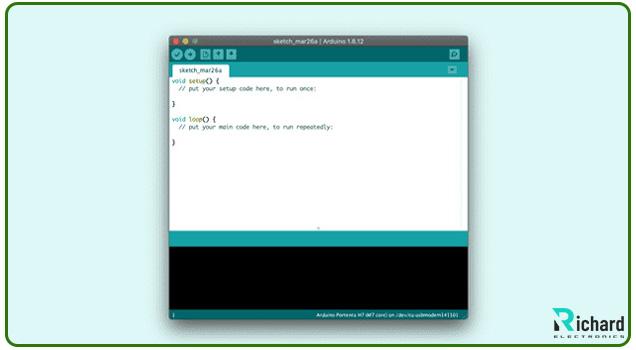
Main attributes of the Arduino IDE:
1. Cross-Platform: It is accessible to a wide audience because it is available for Windows, macOS, and Linux.
2. Sketch-Based Programming: Sketches are the code used to create Arduino applications. Written in C/C++, these drawings are simplified to help novices with
Programming.
3. Built-in Libraries: The Arduino IDE offers a plethora of sensor, communication protocol, and display libraries that are readily incorporated into projects.
4. Serial Monitor: This built-in utility helps an instant connection between the pc and the Arduino, and is recommended for debugging and trying out purposes.
5. Board Manager: A range of Arduino boards are supported with the aid of the Arduino IDE, and customers may also add assistance for greater microcontrollers, such as the Arduino Mega 2560, the usage of the board manager.
6. Code Samples: Beginners may get started on projects rapidly with the help of the IDE's collection of sample codes.
Those with less programming knowledge may create complex projects because the Arduino IDE simplifies the coding process.
Simulation of Arduino Mega 2560 Projects
It's an excellent idea to simulate your Arduino Mega 2560 ideas before putting them into practice to save time, money, and materials. Without requiring real hardware, simulation tools aid in software and circuit design optimization and debugging.

General Arduino Mega 2560 Simulation Tools:
1. Proteus Design Suite: Embedded simulation and intricate circuit design are supported by this professional-grade simulation program. It is compatible with Arduino boards, including the Mega 2560, and is perfect for intricate applications.
2. SimulIDE: The ATmega2560 is among the microcontrollers that may be simulated in real-time using this portable, real-time tool. For short testing and simple tasks, it is an excellent option.
3. Proteus Design Suite: Embedded simulation and intricate circuit design are supported by this professional-grade simulation program. It is compatible with Arduino boards, including the Mega 2560, and is perfect for intricate applications.
4. Fritzing: Another easy-to-use tool for circuit modeling and documentation is Fritzing. It offers comprehensive PCB (Printed Circuit Board) design visuals and lets users simulate Arduino projects.
5. Tinkercad Circuits: Users can create circuits and run Arduino code on Tinkercad, an online simulation environment that is suitable for beginners. It enables real-time simulation and comes with a variety of components.
Conclusion
With its exceptional build quality and long-lasting durability, the Arduino Mega 2560 is a microcontroller that can handle various industrial control systems, processors, and home automation applications. It is an essential tool for professionals and enthusiasts alike because of its multitude of I/O ports, big memory, and interworking with many sensors and modules. When combined with the pleasant Arduino IDE and robust community support, rapid development and prototyping are possible. Its capacity to model projects before their actual execution streamlines the design procedure even further. All things considered, the Mega 2560 is a great option for intricate electronics projects since it perfectly balances capability and ease.
- 1.
How many digital I/O pins does Arduino Mega 2560 have?
Arduino Mega 2560 has a total of 54 digital I/O pins from D2 - D53, excluding power and ground pins.
- 2.
What is the operating voltage of Arduino Mega 2560?
The board operates on a voltage level of 5V and provides 5V and 3.3V for powering the external device interconnects.
- 3.
Which simulation tools can be used for Arduino Mega 2560 projects?
There are several simulation tools for Arduino Mega 2560 projects. Such as Proteus Design Suite which supports embedded simulation and intricate circuit design for complex applications. SimulIDE is a portable, real-time tool that can simulate the ATmega2560 microcontroller and is good for short testing and simple tasks. Fritzing is an easy-to-use tool for circuit modeling and documentation, allowing users to simulate projects. And Tinkercad Circuits is an online simulation environment suitable for beginners that enables real-time simulation with various components available.
View More
 Sophie
Sophie, an accomplished electronic designer from Canada, holds a Bachelor's degree in Electrical Engineering from McGill University. She excels in developing advanced control systems that integrate mechanical, electrical, and computer engineering technologies. Her expertise particularly lies in working with electronic components. Notably, she has distinguished herself in conducting research involving Arduino and Raspberry Pi.

28 November 2025
25 October 2025

25 September 2025
16 August 2025
10 July 2025